The right approach depends on whether you need paths, posture, or evidence
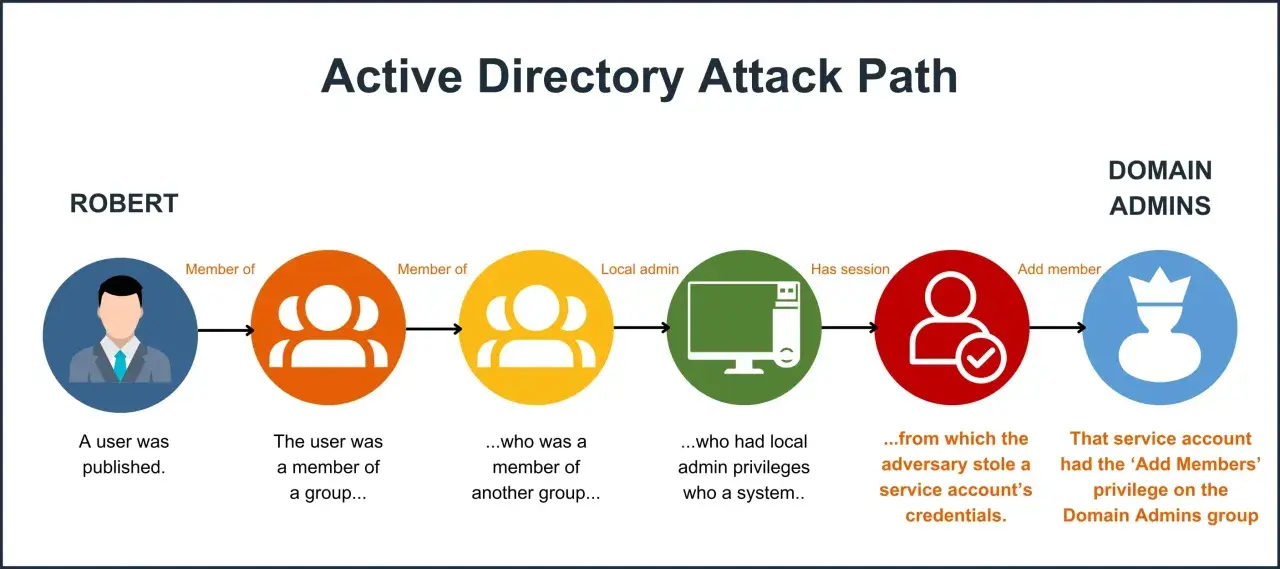
- BloodHound CE is best when hidden privilege paths matter most.
- PingCastle is the fastest way to get a risk-focused view of domain hygiene.
- ADRecon is useful when you need a shareable report rather than an interactive graph.
- Microsoft's AD cmdlets are the cleanest baseline for precise, low-noise queries.
- The best results come from combining one graph tool, one health-check tool, and one validation layer.
What these tools actually do inside an AD review
I treat enumeration as the read phase of an Active Directory assessment. The job is to map users, groups, trusts, organisational units, group policy links, access control entries, sessions, service accounts, and delegation so that the environment stops feeling abstract. If the output does not help me answer who can reach what, it is just inventory.
That distinction matters because different tools are built for different questions. Some are designed to expose attack paths, some to score the overall posture of the domain, and some to give me a tidy report I can hand to another team. Once I know the question, the next step is choosing the tool family that answers it with the least friction.
The shortlist I would actually start with first
I group the field into five families rather than one long shopping list. That keeps the choice practical and avoids the common mistake of picking a tool because it is popular instead of because it fits the task.
| Tool family | Best for | Strength | Trade-off | Cost signal |
|---|---|---|---|---|
| Graph-based collectors | Attack paths, privilege relationships, trust mapping | Excellent at showing how a low-privileged foothold can reach tier-0 | Needs ingestion, analysis discipline, and enough resources to handle the dataset | BloodHound CE is free |
| Health-check and scoring tools | Fast posture review, trust hygiene, management reporting | Quickly surfaces the biggest risks without forcing you to build your own model | Less interactive than a graph platform and less precise for individual paths | PingCastle Community is free; Service Provider starts at $1,000 per assessment; Enterprise starts at $30 per identity per year |
| Report generators | Snapshot exports, evidence packs, handoff to auditors or managers | Produces a holistic report that is easy to share and review offline | Static output, so it is not the best choice when you need interactive path exploration | ADRecon is open source |
| Native AD cmdlets | Targeted validation and low-noise queries | Precise, scriptable, and familiar to Windows administrators | You have to design the analysis yourself | Included with the Windows admin stack |
| LDAP clients and scripts | Cross-platform recon and custom queries | Flexible enough to ask almost any directory question | Quality depends on operator skill and query discipline | Usually free |
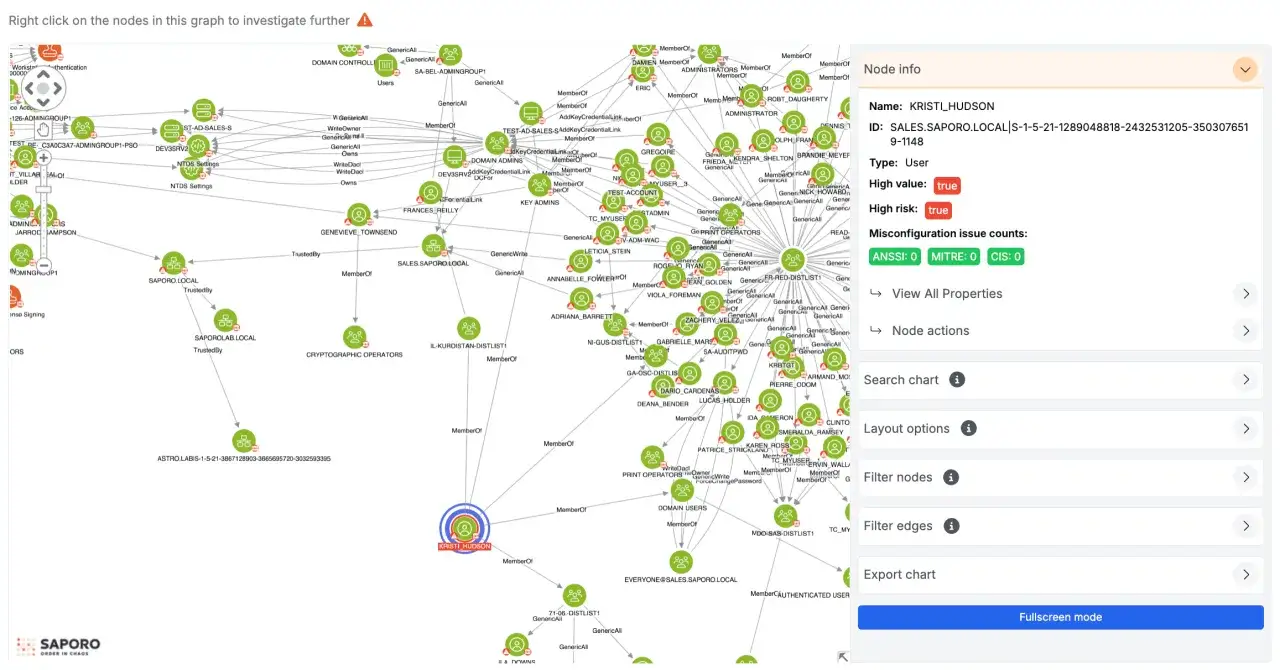
BloodHound CE is the one I reach for when the real problem is relationship discovery. SpecterOps' quickstart says the CE stack runs as a containerised setup and lists 8 GB of RAM, 4 processor cores, and 10 GB of disk as the minimum baseline; once you move beyond 50,000 users, the recommendation jumps to 96 GB of RAM, 12 cores, and 50 GB of storage. That is a useful reminder that graph analysis is powerful, but it is not weightless.
PingCastle is the tool I prefer when the question is, "What are the biggest hygiene issues right now?" Its default health check quickly gathers the important data, scores the sub-processes of the domain, and reports the risks. ADRecon sits in a different lane: it is better when I want a report I can hand to someone who does not want to live inside a graph UI.
For targeted verification, I still like the built-in PowerShell route. Microsoft Learn documents the ActiveDirectory module with cmdlets such as Get-ADUser, Get-ADGroup, Get-ADTrust, Get-ADForest, and Get-ADDomainController, which is exactly what I want when I need a precise answer instead of a broad sweep.
How I choose the right stack for a real environment
I start with the objective, not the brand name. If I need to prove attack paths, I want a graph tool. If I need to brief leadership on risk, I want a score or a report. If I need to validate one suspicious relationship, I want a narrow query I can explain line by line.
- If I need path discovery, I start with BloodHound CE and collect enough data to see user, group, trust, session, and privilege relationships.
- If I need a fast posture baseline, I run PingCastle first and use its health check to identify the biggest domain weaknesses.
- If I need a shareable artefact for audit, I use ADRecon because the Excel-style output is easier to circulate than a graph.
- If I need to confirm a single edge or membership chain, I use native AD cmdlets or an LDAP query so the result is easy to defend.
That same logic applies to access level. A domain user with limited visibility may get enough value from a health-check tool and a few targeted queries. A privileged assessor can justify deeper graph collection because the return is much higher. In UK organisations, this often matters more than the tool itself, because the evidence chain has to survive change control, audit review, and internal scrutiny.
The real decision is not which tool is "best"; it is which combination gives you the clearest answer with the least unnecessary noise. Once that is clear, the output becomes much easier to interpret.
What good output looks like and what I ignore
Good enumeration output is not the biggest export. It is the export that makes the risk obvious. I care about the pieces that change priority, not the rows that merely increase volume.
- Shortest paths to tier-0 or other high-value assets, especially when they run through ordinary user groups.
- Overbroad group nesting that quietly gives more people access than the naming suggests.
- Stale privileged accounts and dormant service accounts that still have meaningful rights.
- Trust issues, including SID filtering gaps and relationships that cross boundaries without a clear business reason.
- Local admin sprawl and session exposure on machines that should be more tightly controlled.
- Weak ACLs that allow non-administrators to change users, groups, OUs, GPOs, or AD CS objects.
- Mis-scoped policy and delegation that looks harmless until it is combined with another edge.
PingCastle is particularly useful here because its risk model tends to surface the kinds of issues that make a domain feel old, flat, or over-permissive: stale objects, privileged account problems, trust weaknesses, ACL problems, SID filtering, and control-path risks. BloodHound gives me the relational side of that picture, which is what I need when I want to understand why a weakness matters.
What I usually ignore at first are the findings that look dramatic but do not change the path to a critical asset. A thousand low-value rows are less important than one route from a standard workstation account to a domain-admin-equivalent position. That is the level where remediation actually pays off.
Common mistakes that make enumeration noisy but useless
The most common mistake I see is starting with a tool and only later deciding what question it was supposed to answer. That produces pretty exports and weak conclusions. The better habit is to decide whether the goal is attack-path discovery, domain hygiene, or evidence collection, then choose accordingly.
- Collecting everything by default when a targeted pass would have been enough.
- Confusing visibility with value, which leads teams to celebrate volume instead of insight.
- Ignoring environment size, especially when a graph-based collector is run on hardware that is too small for the dataset.
- Trusting one source blindly instead of validating the important findings with a second method.
- Skipping baselines, which makes it impossible to prove that the domain actually improved after remediation.
- Using the same playbook everywhere, even though tiering, trusts, and administrative boundaries differ from one estate to another.
I also think teams underestimate how much time is lost when they treat a one-off export as the final word. Enumeration is only useful if it can be repeated after the fix, compared against the last state, and used to show that a control path has actually disappeared.
A workflow that turns recon into remediation
If I were building this into a repeatable security process, I would keep it simple. Start with a posture check, move into graph-based path discovery, and then validate the findings with narrow directory queries. That gives me three views of the same environment without drowning the team in duplicate work.
From there, every confirmed issue should become a ticket with an owner, a business impact statement, and a clear fix path. In practice, that means removing redundant admin rights, tightening trusts, cleaning up stale accounts, and fixing ACLs or delegation where they create unnecessary reach. The value is not in the scan itself; it is in the reduction of reachable privilege.
For a UK security team, that workflow usually creates better evidence than a pile of raw exports ever will. It is easier to justify, easier to repeat, and easier to defend when someone asks what changed, why it changed, and whether the environment is actually safer now.